


Fast PDF to PowerPoint Pro
Free Best Adobe PDF to Office PowerPoint Document Converter Offline Batch Convert PDF to editable MS Office PowerPoint(.pptx), preserving original formatting and layouts.
Cost / License
- Pay once
- Proprietary
Platforms
- Mac

Fast PDF to PowerPoint Pro
Features
- Convert PDF to Powerpoint
- PDF to PPT
Tags
Fast PDF to PowerPoint Pro News & Activities
Recent activities
Fast PDF to PowerPoint Pro information
What is Fast PDF to PowerPoint Pro?
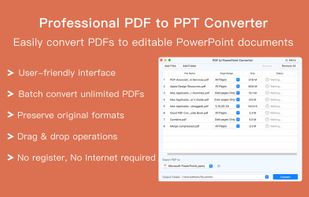
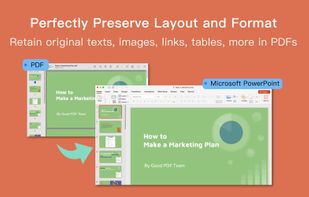
Convert Acrobat Adobe Reader PDF documents to PowerPoint Presentation with preserved original texts, images, layouts, hyperlinks, bullets, tables, and bezier graphics.
No need to copy-paste, No need to upload, 100% process document conversion on your device, so No need to worry about privacy. This easy-to-use Adobe Reader PDF to Office converter for Mac allows you to convert multiple PDF documents to other formats in batch within one minute, even for more than 1000-pages large PDF files conversion. So that you can reuse and edit Foxit PDF contents in a PPT processor, like Microsoft PowerPoint, WPS Office, LibreOffice, Google Doc, Apple Keynote, and other presentation apps.
*** Main Features *** · Professional Foxit Batch PDF to PowerPoint converter · Offline WPS PDF to PowerPoint converter · Fast Adobe Acrobat PDF to PPT converter Expert · Incredibly easy to use · Accurately convert Good PDF files to fully-editable PowerPoint (.pptx) documents · Add unlimited WPS PDFs at one time · Support partial and good batch pdf conversion · 100% locally process Fast PDF to pptx conversion · Superior accuracy and layout, formatting retention
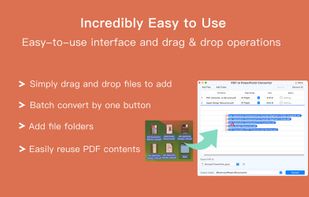
*** Incredibly easy to use *** · Simple workflow with an extremely clear and user-friendly interface and convenience operations · Import PDF documents in batch or import file folder with drag and drop operation · Reorder and arrange PDFs by drag & drop operation · Fast Batch convert PDFs with one button · Concise and neat interface · Easily reuse and edit texts and images in PDF documents
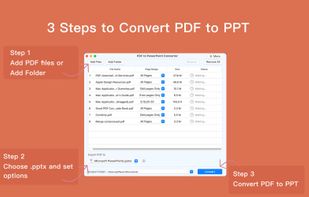
*** 3 steps to convert Adobe Acrobat PDF to MS/WPS Office PPT file *** · Step 1. Add Foxit PDF files by Drag and drop, Add Files, Add Folder · Step 2. Choose output settings and the output folder · Step 3. Tap Convert button. Then it exports PDF as PPT within 1 minute
*** High accuracy, all formats and layout retention *** · Preserve original texts, images, layouts, hyperlinks, tables, and graphics exactly · Output PDF files to Microsoft Office 2003, 2007 and 2010 Version(.pptx) , which can be opened by 2003 and later Microsoft Office apps
*** Quick and efficient conversion saves your time *** · Convert large PDF files with thousands of pages without problems. It makes PDF conversion quite easy and efficient · Export large PDFs in less than 1 minute, high speed conversion · Easily manage PDFs by drag & drop, rearrange, and delete features · Configure conversion pages like All Pages, Odd pages Only, Even pages Only, and any particular pages (e.g. 1,2-10) to meet your needs · Add and convert Unlimited PDF files · 100% fast speed to process PDF files locally · Foxit Batch PDF to PowerPoint Converter
We are continuously developing this app, please feel free to contact us at goodpdfteam@gmail.com with any suggestions, ideas, questions or problems. We will reply shortly.
