


Display Driver Uninstaller
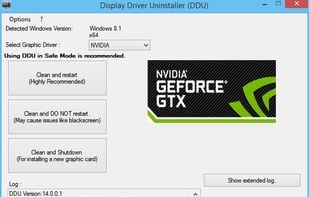
Perform clean installation of video drivers by removing old ones first, then blocking Windows from automatically installing a default driver.
Cost / License
- Free
- Proprietary
Platforms
- Windows

Features
- AMD
- Software Uninstallers
Display Driver Uninstaller News & Activities
Recent activities
 OrdinaryPerson added Display Driver Uninstaller as alternative to NVCleanstall

Display Driver Uninstaller information
Developed by
 Wagnard Mobile
 Licensing
Proprietary and Free product.Alternatives
3 alternatives listedSupported Languages
- English


Featured in Lists
A list with 51 apps by Riiku without a description.

A list with 49 apps by mercury7 without a description.
What is Display Driver Uninstaller?
Display Driver Uninstaller is a driver removal utility that can help you completely remove AMD/NVIDIA graphics card drivers and packages from your system, without leaving leftovers behind (including registry keys, folders and files, and the driver store).
The AMD/NVIDIA video drivers can normally be uninstalled from the Windows Control panel, this driver uninstaller program was designed to be used in cases where the standard driver uninstall fails, or whenever you need to thoroughly delete NVIDIA and ATI video card drivers. The current effect after you use this driver removal will be similar as if its the first time you install a new driver just like a fresh, clean install of Windows. As with any tool of this kind, we recommend creating a new system restore point before using it, so that you can revert your system at any time if you run into problems. This tool acts similar to what other driver cleaner programs do + the extra mentioned above. If you have problem installing older driver or newer one, give it a try as there are some reports that it fixes those problems.
Comments and Reviews
I only used this utility once when I was having trouble updating one of my GPUs, but it got the job done and with the instructions I was given, it was actually pretty easy to do.
this utility really makes things so easy for updating your video card drivers, without worry of leaving old remnants of the previous version behind. it makes doing a clean install incredibly easy, and is very thorough in which it has options to safeguard against issues that may arise (creating a system backup, etc.). so it cleans virtually every aspect of the old driver (and any other driver lingering around), guides you to restart the computer in a safe-mode in which it automatically blocks the well-known windows culprit for when no video driver is present, to start installing the default windows-based one that is rarely what you are looking for. so it's really nice to have it boot up in safe mode, not try to install the windows archaic drivers that are very generic, then to have whatever your brand of gpu's installer pop-up shortly, where you are given the option to do a clean install.
it will simply request to restart the computer, and once that is complete - you have a very, very clean install of the driver you wanted to install for your video card. absolutely excellent! highly recommended.
DDU has a feature that let's you know when a new version is available - and honestly, it will happen often, as it maintained so frequently and diligently by the wonderful Wagnard. i have no affiliation with him, but i can honestly say he deserves much kudos from the community for doing such fantastic work imo. It was such a hassle to go back and forth between video drivers before DDU came along. Thanks Wagnard!
[Edited by menace97, August 16]
keep in mind, you may want to use something like ReIcon or something similar which remembers where all your desktop icons are: ReIcon
... as with any program or any time that your display changes, your icons and shortcuts on your desktop will get rearranged as you cycle through different resolutions for example - so if you happen to have many icons on your desktop and have a particular place for each one, i would recommend taking a screenshot of your desktop and/or using something like ReIcon to put those icons back where they were before the changes in display resolutions - to get the new driver up and running back to the original resolution/display. Hope that is helpful!