


Franzis CutOut
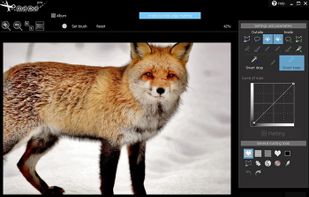
With CutOut you can perfectly cut out difficult image motifs, insert them precisely and easily remove disruptive objects with the click of a mouse. Create the perfect photo montages, in which you can cut out objects with a few mouse clicks and insert into another photo – just as...
Cost / License
- Pay once
- Proprietary
 EU
EUPlatforms
- Windows
- Adobe Photoshop Elements
- Adobe Photoshop

Features
- Dark Mode
- Support for 4K
- Chroma Key / Green Screen
- RAW Photo Editors
- Live Preview
- Remove Unwanted Objects
- Batch processing
- Noise Reduction
Franzis CutOut News & Activities
Recent activities
Franzis CutOut information
Developed by
 Franzis Verlag GmbH
 Licensing
Proprietary and Commercial product.Pricing
One time purchase (perpetual license) ranging between $69 and $99.Alternatives
17 alternatives listedSupported Languages
- English
AlternativeTo Category
Photos & Graphics


What is Franzis CutOut?
With CutOut you can perfectly cut out difficult image motifs, insert them precisely and easily remove disruptive objects with the click of a mouse. Create the perfect photo montages, in which you can cut out objects with a few mouse clicks and insert into another photo – just as if you photographed your object in front of this background.
All Highlights at a glance Optimized automatic Edge Recognition algorithms Easily layer and swap between various backgrounds Remain in full control with the enhanced Preview Mode Directly swapping background layers is now easy! Segmented micro cut edge recognition for white background Chroma Key matting – Blue screen technology Inner/outer edge matting Tools for improving masks Contour tool for precise quick selection
More features Selectable user interface light/dark Custom icon sizes, 4K compatibility Ready for any task with three finely tuned matting methods Cut out hair, fur and other delicate objects in just a few clicks Comes with integrated RAW-developer Huge time savings with a combination of color-, edges- and segment recognition Chroma key matting for Hollywood-like blue screen effects Remove unwanted objects from your images at the click of a button