


CuteClips
CuteClip 3 is the perfect companion for Mac OS Xs native clipboard. It integrates perfect with the look of Mac OS X and completely stays out of the users way. CuteClips sits in the background and continuously records changes to the clipboard in order to provide access to them...
Cost / License
- Freemium
- Proprietary
Platforms
- Mac

CuteClips
Features
CuteClips News & Activities
Recent activities
CuteClips information
What is CuteClips?
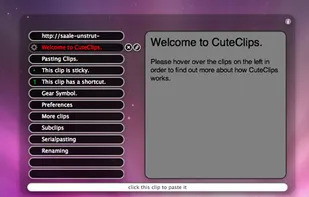
CuteClip 3 is the perfect companion for Mac OS Xs native clipboard. It integrates perfect with the look of Mac OS X and completely stays out of the users way. CuteClips sits in the background and continuously records changes to the clipboard in order to provide access to them when the user needs it. CuteClips 3 is a complete rewrite, which we used to focus on whats most important: simplicity. The simple but highly efficient user interface allows the user to quickly find the clip that he/she is looking for. This is achieved providing a textual list of all clips for a perfect overview in addition to a huge preview for a detailed view of a clip.
To activate CuteClips 3 the user can either use the the menu item or the HotKey, which defaults to Command-Shift-V, the shortcut for pasting but with a pressed shift key. CuteClips can either be controlled by mouse, but also via keyboard, which makes it useful also for seasoned users who prefer speed and efficient usability.
To prevent clips from being automatically deleted, the user can make clips sticky or assign shortcuts to them. With these shortcuts the clips can be pasted without even searching for them. The user just needs to activate CuteClips and hit the shortcut key and its clip is pasted instantly. Some more advanced features in CuteClips are the ability to paste any clip as plain text, paste multiple clips in a row or paste only parts of a clip.
Feature Highlights:
- Easy to use interface
- Big preview for each clip
- Fully accessible via keyboard or mouse
- Automatically records any changes to the clipboard in background
- Keep track of 12 - 50 clips
- Richtext clips can be pasted as plaintext with ease (press cmd when selecting the clip)
- Paste several clips in a row by selecting them with space
- Make clips sticky to prevent them from being deleted automatically
- Assign shortcuts to clips for faster access
- Paste only parts of clips, e.g. only the name of a copied file