


Cisdem PDF Compressor
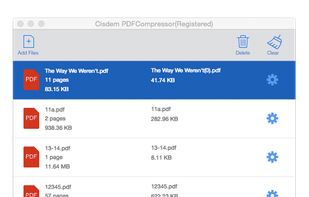
Cisdem PDF Compressor makes it easy to compress the size of single or multiple PDFs. With 4 compression modes, you can reduce PDFs size whilst maintain PDF original format. Now just drop the file into it, choose a compression mode, then you do it!.

Features
Properties
- Lightweight
Features
- PDF compression
- File Compression
Tags
- reduce-pdf-file-size
- pdf-compressor
- pdf-software
Cisdem PDF Compressor News & Activities
Recent activities
- Katharina reviewed Cisdem PDF Compressor
I frequently use the app's two conversion levels: "Custom" and "Medium File Size." These levels compress my PDF files without causing excessive, visible loss of quality in images and text. If my PDF files consist only of text and no images, I select "Small File Size." This level compresses them by up to 90%.
- Katharina liked Cisdem PDF Compressor
Cisdem PDF Compressor information
Developed by
UnknownLicensing
Proprietary and Freemium product.Pricing
free version with limited functionality.Alternatives
2 alternatives listedSupported Languages
- English

What is Cisdem PDF Compressor?
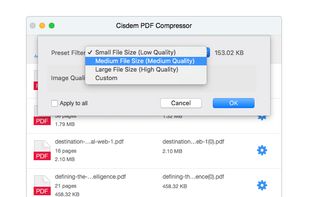
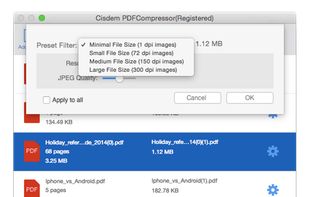
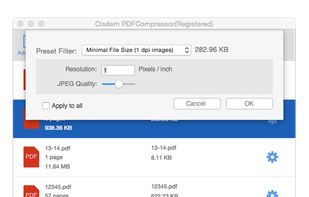
Cisdem PDF Compressor is the smartest PDF compressor to reduce PDF file size on Mac and Windows. With the user-friendly interface, it can easily compress the size of single or multiple PDF files and maintain the original PDF format. Besides, four preset filter modes (Small File Size, Medium File Size, Large File Size, Custom) let you quickly set the resolution and JPEG quality for different PDF documents.
Key Features:
- Rich compression modes: Cisdem PDF Compressor comes with 4 preset filters to meet different demands, including small file size (low quality), medium file size (medium quality), large file size (high quality) and customize compression modes by clicking the slider bar.
- Support Batch Compression: No matter compress hundreds of PDF documents or a 500-page PDF file, it just needs one click.
- Keep the Highest Quality: Even if your document covers images, graphics and other data, it can help you shrink PDF files quickly with the highest quality.
- Fast compression speed: It supports uploading and processing multiple PDF files at one time without any limitations. Users can easily drag-and-drop many files into the panel for compression.
- Reduce PDF files size up to 90%: Compared with similar products, Cisdem PDF Compressor can reduce PDF file size up to 90% within seconds.
- Easy to use: Clean program interface and drag-and-drop design make it easy to upload files and reduce the file size.
- Cisdem PDF Compressor is available on macOS 10.10 or later and Windows 11/10/8/7
Comments and Reviews
I frequently use the app's two conversion levels: "Custom" and "Medium File Size." These levels compress my PDF files without causing excessive, visible loss of quality in images and text. If my PDF files consist only of text and no images, I select "Small File Size." This level compresses them by up to 90%.