


Chalkboard for Windows
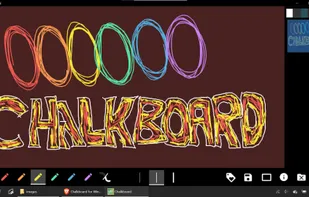
How would you like to write on your screen? Write quickly and effectively. Notes can be saved and deleted with one click. What makes this even more fun is that you can draw with your hand if you have a touch screen.
Cost / License
- Free
- Proprietary
Platforms
- Windows

Features
- Lessons
Tags
- teaching
- homeschooling
- chalkboard
Chalkboard for Windows News & Activities
Recent activities
Chalkboard for Windows information
Developed by
Nigel M Openshaw DevelopmentLicensing
Proprietary and Free product.Alternatives
1 alternatives listedSupported Languages
- English

What is Chalkboard for Windows?
How would you like to write on your screen? Write quickly and effectively. Notes can be saved and deleted with one click. What makes this even more fun is that you can draw with your hand if you have a touch screen.
- Chalkboards color can be changed from white, dark green, dark red, and dark grey.
- Pens come in three different sizes, including fine drawing, standard pencil, and marker pen sizes.
- Use an eraser for wiping the board.
The UI is modern Windows 10 style and very minimal. Perfect for classroom or office use.
This software grew from development in wanting to create my own sketch/ tutoring board for teaching. The features are intentionally minimal and clean to clone the smartphone-style and complete it on a PC. This software works well on most devices and even better if you have a touch screen.