


CaptureStuff
Speed up your creative work with this integrated collection of screen capturing tools including a magnifier, a screen copier, a distance gauge, a color picker, a ruler and a clipboard helper.
Cost / License
- Pay once
- Proprietary
Platforms
- Windows

CaptureStuff
Features
Properties
- Lightweight
Features
- Support for Multiple Monitors
- No Tracking
- No Coding Required
- Works Offline
- Ad-free
- Clipboard monitoring
- Color Picker
- Image Conversion
Tags
- ruler
CaptureStuff News & Activities
Recent activities
CaptureStuff information
Developed by
 Basta Computing
 Licensing
Proprietary and Commercial product.Pricing
One time purchase (perpetual license) that costs from $20.Alternatives
0 alternatives listedSupported Languages
- English
What is CaptureStuff?
CaptureStuff is an integrated collection of tools designed to speed up your communication and creative work. It includes the following components.
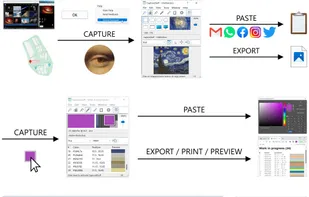
A screen copier to capture windows, window parts, display monitors, and areas in multiple shapes including freehand, with transparency support. You can then paste captured elements into other applications or export them to files in multiple formats.
A color picker to capture pixel colors on the screen and paste them into other applications in just two clicks without losing focus, or export them to files, preview and print them in a web browser.
A gauge to measure elements and maps on the desktop with the cursor in multiple units and shapes including multiple-point paths.
A ruler to measure elements and maps on the desktop horizontally and vertically in multiple units. The ruler includes a cursor guide, real-time coordinates and pixel-by-pixel moving for added precision.
A magnifier to scrutinize areas on the desktop as you move the cursor around and copy items of interest.
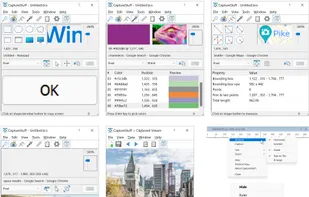
A Windows clipboard helper to monitor in real-time data copied in applications including image properties and text statistics. You can also import files into the clipboard to paste them into applications, and export or convert copied or imported data to files in multiple formats including TXT, PNG, GIF, JPG, TIFF, BMP, WMF, EMF and ICO.
CaptureStuff runs anchored in the system tray so you can keep it hidden while you focus on your work and bring it up instantly when you need it, or just capture stuff even while it's hidden using the hot keys and auto-copy features.