



Bank Statement Convert
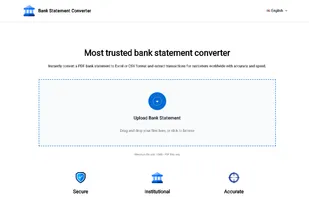
Bank Statement Converter quickly turns PDF bank statements into structured Excel and CSV files, free to use, accurate, and privacy-focused.
Cost / License
- Free
- Proprietary
Platforms
- Online

Features
Tags
- bank-statement
- pdf-conversion
Bank Statement Convert News & Activities
Recent activities
 pnkjjsr added Bank Statement Convert as alternative to Bank Statement Converter AI
 jairamp added Bank Statement Convert as alternative to Bank PDF to Excel converter
- ranksensei added Bank Statement Convert
 ranksensei added Bank Statement Convert as alternative to Bank Statement Extractor and Bank Statement Converter
Bank Statement Convert information
Licensing
Proprietary and Free product.Alternatives
4 alternatives listedSupported Languages
- English


What is Bank Statement Convert?
Bank Statement Converter is lightweight, completely free online software, which eases out the keeping of financial data. Most banks issue statements only in PDF format, which becomes highly cumbersome while one tries to analyze, share, or import them directly into accounting systems. With the help of this tool, PDF bank statements can be converted to structured Excel and CSV files in seconds.
It supports thousands of banks all over the world and detects important columns like date, description, and amount automatically. The conversion is fast, reliable, and accurate through a variety of different layouts, even those that have merged rows or unusual formatting.
Data are not stored after processing, which makes Bank Statement Converter privacy-focused, so that sensitive financial documents may very well be handled securely. Very appealing in simple and clear interface-No sign-up or technical knowledge required, so anyone can convert their statements into fully usable spreadsheets within minutes.
This tool could save hours of boring manual copy-paste work for freelancers, accountants, and business owners while keeping his or her financial data always in usable format. Future improvements will bring added support for scanned PDFs using OCR, integration with popular accounting platforms, including QuickBooks and Xero, and batch conversion options for companies with multiple statements.