



Bank PDF to Excel converter
Convert PDF bank statements to Excel, CSV, or QBO format instantly. Secure, free, and supports all major banks.
Cost / License
- Free
- Proprietary
Platforms
- Online

Features
- Bank integration
- Convert PDF to Excel document
- Built-in PDF converter
Tags
- pdf-to-qbo
- pdf-to-csv
Bank PDF to Excel converter News & Activities
Recent activities
- jairamp added Bank PDF to Excel converter
 jairamp added Bank PDF to Excel converter as alternative to Bank Statement Convert, Bank Statement Extractor and Bank Statement Converter
Bank PDF to Excel converter information
Licensing
Proprietary and Free product.Alternatives
3 alternatives listedSupported Languages
- English
AlternativeTo Category
Business & Commerce


What is Bank PDF to Excel converter?
Transform Your PDF Bank Statements Into Usable Data
Stop manually typing bank statement data into spreadsheets. This extension converts your PDF bank statements directly into Excel, CSV, or QuickBooks Online (QBO) format with just a few clicks.
What It Does: • Upload any PDF bank statement from your computer • Automatically extracts transaction data, dates, amounts, and descriptions • Converts to your preferred format: Excel (.xlsx), CSV, or QuickBooks Online (.qbo) • Works with statements from all major banks and credit unions • Preserves all transaction details including running balances
How It Works:
- Click the extension icon in your browser toolbar
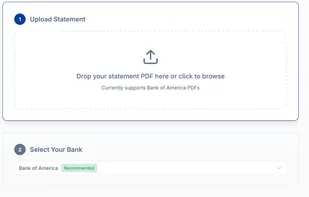
- Upload your PDF bank statement (drag & drop or browse)
- Choose your output format (Excel, CSV, or QuickBooks)
- Click convert and download your formatted file
- Import directly into Excel, Google Sheets, or QuickBooks Online
Key Features: • Secure Processing: Your files are processed securely and deleted immediately after conversion • No Registration: Start converting immediately without creating accounts • Multiple Formats: Choose from Excel, CSV, or QuickBooks Online formats • Bank Compatibility: Works with statements from Chase, Bank of America, Wells Fargo, and hundreds of other banks • Fast Processing: Most statements convert in under 30 seconds • Free to Use: No hidden fees, subscriptions, or usage limits
Supported Banks Include: Chase, Bank of America, Wells Fargo, Citibank, US Bank, PNC, Capital One, TD Bank, SunTrust, BB&T, Regions Bank, Fifth Third Bank, KeyBank, Huntington Bank, and many more.
Privacy & Security: Your financial data is processed securely using bank-level encryption. Files are automatically deleted from our servers immediately after conversion. We never store, share, or access your personal financial information.
Technical Details: • Supports PDF files up to 10MB • Works with password-protected PDFs (enter password when prompted) • Handles multi-page statements automatically • Preserves transaction categories and memo fields • Maintains proper date formatting for import compatibility
Common Use Cases: • Expense Tracking: Convert monthly statements to Excel for budget analysis • Tax Preparation: Import bank data directly into tax software • QuickBooks Setup: Convert historical statements for initial data entry • Financial Reporting: Create pivot tables and charts from transaction data • Audit Preparation: Organize bank data for accounting reviews