


Apeaksoft Video Fixer
Like
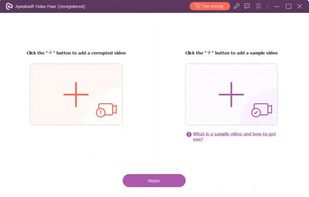
Apeaksoft Video Fixer is a powerful software which can help you recover damaged videos. According to the instructions in the software, an intact video can be recovered from a broken one with just a few clicks.
Cost / License
- Pay once or Subscription
- Proprietary
Platforms
- Windows

Apeaksoft Video Fixer
Like
Features
- Recover Corrupted Files
Tags
- fix-broken-video
Apeaksoft Video Fixer News & Activities
Highlights All activities
Recent activities
No activities found.
Apeaksoft Video Fixer information
Developed by
 Apeaksoft Studio
 Licensing
Proprietary and Commercial product.Pricing
One time purchase ranging between $14 and $70, and / or subscription ranging between $14 and $70 per month.Alternatives
0 alternatives listedSupported Languages
- English
- French
- Japanese
- German
No comments or reviews, maybe you want to be first?
What is Apeaksoft Video Fixer?
Apeaksoft Video Fixer supports the video formats like MP4, MOV, 3GP, AVI. You can unload the video shot by different devices, such as cameras, smart phones, GoPro, etc. You can fix your corrupted videos by one clicking after adding it and the sample video. The fixed video will be same as the sample video in quality. Key Functions:
- Fix Damaged or Corrupted Videos Apeaksoft Video Fixer supports to restore videos in MP4, MOV, 3GP, AVI formats. It can fix unplayable, distorted or black screen videos speedily. You can obtain the fixed video with on defects in an easy way.
- Fix with the Same Quality as the Sample Video Apeaksoft Video Fixer supports uploading videos as a reference. Whether the video was shot on the same format or in the same device, it can be used as a sample video. You can choose the sample video in your demand.
- Preview Fixed Videos Before Saving After video fixing, you can preview part of the video before exporting it to check its effect. If the video in the preview window meets your demand, you can save it to your computer. If you are unsatisfied with the repair, you can change a sample video and fix the original video again.