


Amulet Map Editor
The Amulet Map Editor is a new and innovative Minecraft map editor made by the Amulet Team, a team formed by the contributors that brought you MCEdit-Unified. It supports all versions since Java 1.12 and Bedrock 1.7.
Cost / License
- Subscription
- Proprietary
Platforms
- Mac
- Windows
- Linux

Features
Amulet Map Editor News & Activities
Recent activities
- Teoman_OFF updated Amulet Map Editor
 Ezranon added Amulet Map Editor as alternative to Chunker

Amulet Map Editor information
Developed by
 THE AMULET TEAM
 Licensing
Proprietary and Commercial product.Pricing
Subscription that costs $0 per month.Written in
Alternatives
3 alternatives listedSupported Languages
- English

AlternativeTo Categories
Games, Gaming SoftwareGitHub repository
- 1,528 Stars
- 122 Forks
- 182 Open Issues
- Updated


What is Amulet Map Editor?
Amulet is a new and innovative Minecraft world editor made by the Amulet Team, a team formed by the contributors that brought you MCEdit-Unified.
LEARNING FROM THE PAST
Amulet is a Minecraft world editor built from the ground up with the lessons learnt from previous editors in mind. The program works natively with the blockstate format introduced in 1.13 which enables editing of all world formats.
THE AMULET FORMAT
Amulet is built on top of a world converter that converts all world data into a custom superset format. This means that all worlds can be modified in the same way rather than having custom logic for each world format. WORLD CONVERTER
Amulet comes with a built in world converter that can be used to convert any world Amulet can open into any other world Amulet can open.
WORLD EDITOR
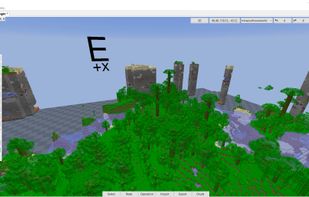
Amulet has an interface like MCEdit for editing worlds. It can be used to:
- fill and replace large selections of blocks
- copy and paste between worlds, even across different versions and platforms
- delete chunks so the world can recreate them
- import and export to various structure formats
- run custom user created operations written in python 3
THE CONSTRUCTION FORMAT
There are a number of external storage formats for Minecraft data but none of them met all of our requirements.
As such we have created the construction format. The construction format is a file to store Minecraft chunk data to disk so that it can be loaded after closing the editor, passed between computers or users or even to other programs that support the construction format.
The construction format can hold data for Java and Bedrock and all versions of each. It supports multiple selection boxes. It stores sub-chunks individually so memory is not wasted on empty sub-chunks.