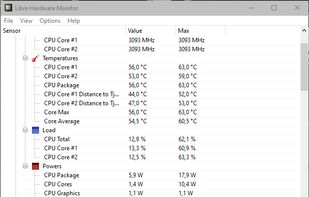
Libre Hardware Monitor, a fork of Open Hardware Monitor , is free software that can monitor the temperature sensors, fan speeds, voltages, load and clock speeds of your computer.

There are many alternatives to SpeedFan for Windows and since it's discontinued a lot of people are looking for a replacement. The best Windows alternative is Libre Hardware Monitor, which is both free and Open Source. If that doesn't suit you, our users have ranked more than 50 alternatives to SpeedFan and many of them are available for Windows so hopefully you can find a suitable replacement. Other interesting Windows alternatives to SpeedFan are FanControl by Rem0o, Sidebar Diagnostics, Argus Monitor and Core Temp.
Libre Hardware Monitor, a fork of Open Hardware Monitor , is free software that can monitor the temperature sensors, fan speeds, voltages, load and clock speeds of your computer.

Fan Control is a focused and highly customizable fan controlling software for Windows. It supports multiple temperature sources in min, max and average configurations, and fan curve functions, including but not limited to, linear, graph, and mix to control a single fan.


Almost everyone thinks FanControl by Rem0o is a great SpeedFan alternative.
SidebarDiagnostics - A simple sidebar for Windows desktop that displays hardware diagnostic information.


Does NOT support fan speed controls.
Does not control fan speeds


This alternative is disputed. Sidebar Diagnostics is a legitimate SpeedFan alternative, but it might have issues that some users think are important.
Monitoring temperatures and status of system components such as CPU, GPU and hard disk drive, fan speeds


Good alternative to SpeedFan. Far more up to date.
i think it should be free
Supports more modern hardware, is still regularly updated.


Most users think Argus Monitor is a great SpeedFan alternative.
Core Temp is a compact, no fuss, small footprint, yet powerful program to monitor processor temperature and other vital information.

Does not support Managing Fan Speeds
you can't control the pc fans


Some users think Core Temp is a great SpeedFan alternative, some don't.
AI Suite 3 is an all-in-one interface that integrates several ASUS utilities and allows you to launch and operate these utilities simultaneously.


Hardware sensors monitor utilizes sensor chips on smart motherboards to track system and CPU core temperatures, voltages and cooling fans. By quickly catching an overheated computer, you can prevent disasters such as system instability or damage.


Powerful and easy for setting temperature curves for automatic fan speed control, including hysteresis. Very low CPU usage.


This software detects and optionally controls speed of CPU fan of many PC-Systems. Furthermore you are able to configure the handling of the EC-registers on your own (risk). To determine the EC-registers use e.g. software like "rw everything".


Corsair Link Dashboard software allows you to monitor your system and gives remarkable control over your case fans, lighting, and compatible Corsair power supplies and Hydro Series liquid CPU coolers that work together for optimal cooling and etc.


Take gaming to the next level with OMEN Gaming Hub, OMEN's dynamic software solution. Optimize your hardware, earn real-life rewards, manage your games, play remotely, and more. Think of it as a rare in-game item that boosts all of your character's stats.


Allows you to set the speed depending on the temperature in the form of a graph