


ImgBurn
1533 likes
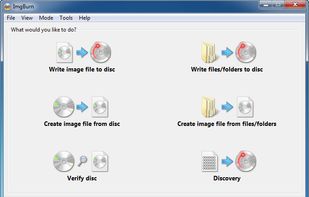
ImgBurn is a lightweight CD / DVD / HD DVD / Blu-ray burning application (39 languages) that everyone should have in their toolkit. ImgBurn supports a wide range of image file formats. It can burn Audio CDs from any file type supported via DirectShow / ACM.

Cost / License
- Free Personal
- Proprietary
Application typeApplication types
Alerts
- Discontinued
Platforms
- Windows


Discontinued
The last version 2.5.8.0 is from June 2013.

Features
Highlights All activities
ImgBurn News & Activities
Recent News
No news, maybe you know any news worth sharing?
Share a News Tip
Recent activities


Tools for the Media Collector
Programs and utilities for creating, managing, and editing media files. Ideal for the most anal retentive of digital media hoarders who need to have everything just so.


Utilities
A list with 33 apps by AntumDeluge without a description.


KungFu
Daily self-defense in the computer technician's routine
Developed by
 Lightning UK!
 Licensing
Proprietary and Free Personal product.Rating
Average rating of 3.5Alternatives
52 alternatives listedBadge
Get an embeddable badge for ImgBurnSupported Languages


Comments and Reviews
In my experience, I've always found ImgBurn to be the most reliable burning tool for making bootable CDs and DVDs. The default burning tools built into Windows 7 and Mac OS X are okay, but they still trip up more often than I would like. ImgBurn is the only one that works every time.
Tried this, but went back to CDBurnerXP.
I like CDBurnerXP's interface much more, ImgBurn is a little too minimal.
It has not been updated in a while and I understand that if there is enough to update then there's no reason to update! But I doubt nothing needs fixing or updating for this many years. I hope fresh developers continue it on.
I also saw no bundled software in the installation, I assume they are downloading it from mirrors adding such things. Download directly from trusted or even the source, compare hashes as well, just to be sure.
ImgBurn seems to be the best, free/open source burner, at least that I could find.
I like using ImgBurn Because first, it is super lightweight and super fast. The second is that it can do all the stuff I wanted with disks and Iso files.
Just downloaded and installed this from Softpedia.com, there was absolutely no malware installed along with it. None.
There's no reason to update it. It supports all current and past optical drives. It supports all optical media current and past. Including laser active, HD-DVD and gdrom (double data CD-R), bluray from single to quad layer, bdrw, DVD-ram. There's really no need for an update until some new media method comes out.
It uses the media's ID to see what the disc is and will support; then looks for the toc to see if there's anything on it. Burns to any and every blank laser media ever made. I wouldn't expect an update until 12K BD media comes out, or one of the holographic medias.
It's pretty easy to use. It does everything that I need. And I never had a problem with it, never.