




Google Translate
Instantly translate text in real-time across over 100 languages using Google Translate. Features include voice input on mobile, offline translations, and integration with Google services. Available for free with no registration, it offers transliteration, pronunciation guidance, and more.

Cost / License
- Free
- Proprietary
Application types
Platforms
- Online
- Android
- iPhone
- Chrome OS
- Android Tablet
- iPad
- Google Docs


Features
- Text to Speech
- Real-time Translation
- Translator
- Multiple languages
- Language Detection
- Website Translation
- No registration required
- Ad-free
- Works Offline
- Built-in Dictionary
- Synonyms
- Translation-platform
- Photo Translator
- Image to text
- Handwriting recognition
- Speech Transcription
- Real-time language translation
Google Translate News & Activities
Recent News
- POX published news article about Google Translate
 Google Translate celebrates its 20th anniversary with new pronunciation practice features
Marking its 20th anniversary, Google Translate has evolved from an artificial intelligence experime...
- POX published news article about Google Translate
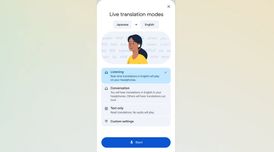 Google Translate's real-time headphone translation feature expands to iOS & more countries
Google Translate’s live translate feature with headphones is now officially available for iOS users...
- Fla published news article about Opera
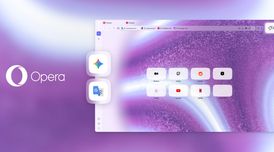 Opera One adds Gemini, Google Translate, and four-tab Split Screen
Opera One now integrates Gemini and Google Translate directly in the sidebar, allowing users quicke...


Recent activities
 Babelarc added Google Translate as alternative to Babelarc
 ai-robot-studio added Google Translate as alternative to AI Robot Translator
 Peter_Anderson added Google Translate as alternative to AI Manga Translator (PetersLab)
 ms20201207 added Google Translate as alternative to Transora
- renatooosousaa liked Google Translate
 torchlight added Google Translate as alternative to Voice Over Translation
 darnerx added Google Translate as alternative to VersQ
 bangcoderpro added Google Translate as alternative to TextBoi
 founderr678 added Google Translate as alternative to Fenly
 TheCool added Google Translate as alternative to translated


Featured in Lists

A list with 422 apps by AmileyaRyver without a description.

A list with 220 apps by alsaygh_qtr without a description.

Fond of testing out new phones? Fond of using LineageOS and other custom ROMs? Yes, me too! It can be just a pain to …
What is Google Translate?
Google Translate is an online translation tool that provides instantaneous translation services for text and web pages across a diverse range of up to 110 languages. The features provided by this tool vary according to the language being utilized.
The platform allows users to translate between languages by typing the text into the interface. It also supports offline translations, enabling users to translate text without needing an internet connection. For image-based text, Google Translate offers an instant camera translation feature, where users can translate text by simply pointing their camera at the image. This feature also extends to photos, whether they are taken directly or imported.
In addition to text and image translation, Google Translate also caters to spoken language. It can translate spoken words and phrases through its dictation feature, and even allows for the translation of bilingual conversations as they occur. The tool can also transcribe, translating the speech of a person speaking a different language in near real-time. For users who prefer to draw text characters instead of typing, Google Translate offers a handwriting feature. Lastly, it includes a phrasebook feature where users can star and save translated words and phrases for future reference.


Google Translate information
Developed by
 Google
 Licensing
Proprietary and Free product.Rating
Average rating of 4Alternatives
103 alternatives listedNews
8 news article related to Google TranslateSupported Languages
- English
- Albanian
- Arabic
- Armenian
- Azerbaijani
- Bengali
- Bosnian
- Bulgarian
- Khmer
- Catalan; Valencian
- Croatian
- Czech
- Danish
- Dutch
- Estonian
- Finnish
- French
- Georgian
- German
- Greek
- Hebrew
- Hindi
- Hungarian
- Indonesian
- Irish
- Italian
- Japanese
- Kazakh
- Korean
- Lao
- Latvian
- Lithuanian
- Macedonian
- Malay
- Malayalam
- Mongolian
- Nepali
- Norwegian Bokmål
- Persian
- Polish
- Portuguese
- Panjabi, Punjabi
- Romanian
- Russian
- Serbian
- Chinese
- Sinhala, Sinhalese
- Slovak
- Slovene
- Spanish
- Swedish
- Tamil
- Thai
- Turkish
- Ukrainian
- Urdu
- Vietnamese
- Welsh
AlternativeTo Categories
Education & Reference, Office & ProductivityApple AppStore
- Updated
- 4.3 avg rating


Comments and Reviews
i used this to translate everything because it is easy to use and fast
Compared to DeepL, the only drawback is the translation quality. On average, it's worse. Otherwise, there are only advantages: a lightweight web page, very high responsiveness (translation is almost instantaneous), no limit on the number of translated documents, no captchas, accessibility without a VPN, the availability of alternative translations, and verification of them through reverse translation (the translation to the source language).
Google Translate won't work without client-side JS at all...
This is a cool service, it helps a lot. I especially like the mobile app. Also translating with the camera is something amazing.
It doesn't always give the most accurate results, but it gives enough of a general idea.
We once had to write a passage in Spanish, about 2 pages long. I wasn't bothered enough, so I went straight onto Google Translator and did the deed. Next thing I know is I am on a week long detention course. My fault, but be warned not to use it when you are not supposed to, because it has its faults!
It gets it right enough that even if it's a bit off you still get the basic gist of the sentence. sure there is room for improvement but it gets the job done and is there when you need it.
[Edited by trekeyus, February 20]