Search Result: Markdown

  1. Markdown icon
     172 likes

    Markdown is a text-to-HTML conversion tool for web writers. Markdown allows you to write using an easy-to-read, easy-to-write plain text format, then convert it to structurally valid XHTML (or HTML).

    Markdown screenshot 1
  2. No style but have format. Create beautiful formatted text document with just plain text. That is Markdown.

    Markdown is a pure editor specifically for writers who use markdown language. It provide a handy support for write markdown.

    • Discontinued
    • FreemiumProprietary
    • iPhone
    • iPad
    Markdown for Medium screenshot 1
  3. MarkdownPad icon
     63 likes

    MarkdownPad is a full-featured Markdown editor for Windows. Features: LivePreview : Instantly see how your documents look in HTML as you create them. Easy formatting with keyboard shortcuts. Markdown formatting can be applied (and removed) with handy keyboard shortcuts and toolb.

    MarkdownPad screenshot 1
  4. Markdown Edit icon
     22 likes

    Markdown Edit is a Windows desktop Markdown editor with an emphasis on content and keyboard shortcuts. There is minimal window chrome and most functions are accessed through keyboard shortcuts.

    Markdown Edit screenshot 1
  5. Caret is a Markdown editor for Mac, Windows and Linux. It stands out with its clean interface, productivity features and obsessive attention to detail.

    • Discontinued
    • Text Editor
    • PaidProprietary
    • Mac
    • Windows
    • Linux
    Caret Markdown Editor screenshot 1
  6. Markdown Here icon
     12 likes

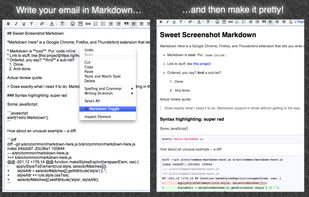
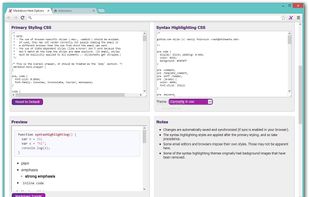
    Google Chrome, Firefox, and Thunderbird extension that lets you write email in Markdown and render it before sending.

    • Discontinued
    • Text Editor
    • FreeOpen Source
    • Mac
    • Windows
    • Linux
    • Google Chrome
    • Google Charts
    • Thunderbird
    • Firefox
    Markdown Here screenshot 1
  7. This is the simplest and slickest Markdown editor. Just write Markdown and see what it looks like as you type.

    • Discontinued
    • FreeOpen Source
    • Mac
    • Windows
    • Linux
    • Online
    • Chrome OS
    • Google Chrome
    Minimalist Markdown Editor screenshot 1
  8. Markdown-it icon
     8 likes

    Markdown-it is a high-speed Markdown parser with 100% CommonMark support, extensions & syntax plugins.

    • FreeOpen Source
    • Self-Hosted
    Home page
  9. A modern macOS markdown editor - themeable, tabs, sidebar, GitHub flavored markdown, exporting, latex and more.

    • Discontinued
    • FreeOpen Source
    • Mac
    Pine Markdown Editor screenshot 1
  10. R Markdown icon
     5 likes

    The rmarkdown package helps you create dynamic analysis documents that combine code, rendered output (such as figures), and prose. You bring your data, code, and ideas, and R Markdown renders your content into a polished document that can be used to:

    • FreeOpen Source
    • Mac
    • Windows
    • Linux
    The Rstudio IDE with a HTML document result on the right
  11. PHP Markdown icon
     4 likes

    PHP port of the Markdown text-to-HTML conversion tool for web writers.

    • FreeOpen Source
    • Mac
    • Windows
    • Linux
    • Online
    • Self-Hosted
  12. Do you often type Markdown code manually for a link or image, or even all tabs in a window, and feel tired? Copy as Markdown can help you!

    • FreeOpen Source
    • Mac
    • Windows
    • Linux
    • Chrome OS
    • Google Chrome
    • Firefox
    Copy as Markdown screenshot 1
  13. Nota is a beautiful and easy to use writing app that's also powerful and efficient. Its simple design enables a wide range of uses: from notes and wikis, to static blogs and websites, to articles and books.

    • PaidProprietary
    • Mac
    Nota (Markdown) screenshot 1
  14. Markdown Monster is a responsive Markdown editor that lets you edit Markdown with syntax highlighting and super fast text entry. A collapsable synced, live preview lets you preview your output as you type.

    • PaidProprietary
    • Windows
    Markdown Monster screenshot 1