Search Result: Autocad

  1. Autodesk AutoCAD icon
     216 likes

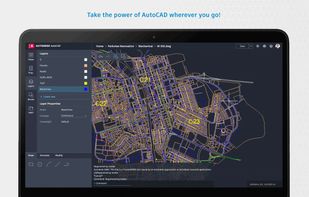
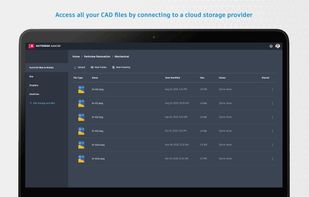
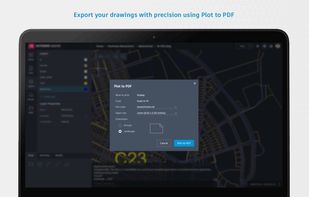
    Versatile CAD software offering 2D and 3D modeling, visualization, and cloud access for architectural and engineering design professionals.

    Cost / License

    • Paid
    • Proprietary

    Application types

    Platforms

    • Mac
    • Windows
    • Online
    • Android
    • iPhone
    • Android Tablet
    • iPad
    Autodesk AutoCAD screenshot 1
    Autodesk AutoCAD screenshot 1
    Autodesk AutoCAD screenshot 2
    +9
    Autodesk AutoCAD screenshot 3
  2. Optimize civil engineering projects with integrated BIM tools within an AutoCAD framework, supporting transportation, land, and water development efficiently.

    Cost / License

    • Paid
    • Proprietary

    Application types

    Platforms

    • Windows
    AutoCAD Civil 3D screenshot 1
    AutoCAD Civil 3D screenshot 1
    AutoCAD Civil 3D screenshot 2
    +4
    AutoCAD Civil 3D screenshot 3
  3. Specialized in electrical design, this toolset features 65,000+ intelligent symbols, wire and tag automation, PLC drawing generation, and compliance with global standards.

    Cost / License

    • Paid
    • Proprietary

    Application type

    Platforms

    • Windows
    AutoCAD Electrical screenshot 1
    AutoCAD Electrical screenshot 1
  4. EASILY use AutoCAD® to Batch Plot your files, Batch Purge, Batch Bind, batch script anything, maximizing your PC's power to perform redundant tasks fast!

    Cost / License

    • Freemium
    • Proprietary

    Platforms

    • Windows
    Hurricane for AutoCAD screenshot 1
  5. Recover and reset lost Autocad VBA macro password with the help of SysTools Autocad DVB Password remover tool. It is a most reliable utility to remove or reset password from an Autocad *.dvb file without affecting macro file codes.

    Cost / License

    • Paid
    • Proprietary

    Platforms

    • Windows
    Browse DVB file
    Tool auto generates password for .dvb file
    you can see new generated password in software screen
  6. DraftSight icon
     86 likes

    DraftSight is a professional-grade, open 2D CAD product for users who want a better way to read, write and share DWG files. DraftSight is easy to use and is available for professional CAD users, students and educators to download and activate for free.*

    Cost / License

    • Paid
    • Proprietary

    Application type

    Platforms

    • Mac
    • Windows
    DraftSight screenshot 1
    DraftSight screenshot 1
  7. AutoMEP icon
     Like

    AutoMEP turns plain language into production ready AutoCAD MEP drawings. Type your requirements, get routed ducts, pipes, and power with correct layers, sizes, and symbols. Export DWG, compare revisions, and enforce company standards in minutes.

    Cost / License

    • Paid
    • Proprietary

    Platforms

    • Online
    • Software as a Service (SaaS)
    Homepage
    Dashboard
    Project Page
    +1
    Finished Jobs
  8. DWG/DGN Drafting Software compatible to AutoCAD®. It offers a full suite of AutoCAD® software compatible drawing tools.

    Cost / License

    • Paid
    • Proprietary

    Application type

    Platforms

    • Windows
    DWDRAFT IntelliCAD screenshot 1
  9. 4MCAD icon
     4 likes

    4MCAD is a releable and low cost AutoCAD alternative. 4MCAD provides full DWG file compatibility, similar User Interface, as well as full support for AutoCAD commands, menus, scripts, styles, patterns.

    Cost / License

    • Paid
    • Proprietary

    Application type

    Platforms

    • Windows
    4MCAD screenshot 1
    4MCAD screenshot 1
    4MCAD screenshot 2
    +2
    4MCAD screenshot 3
  10. Lightweight Windows utility for previewing and inspecting AutoCAD SHX font files via a clean interface, supports batch and single file viewing, and ensures read-only file integrity.

    Cost / License

    • Paid
    • Proprietary

    Platforms

    • Windows
    Main interface of Shx Viewer on Windows.
    Shx Viewer screenshot 1
    Shx Viewer screenshot 2
  11. ABViewer icon
     4 likes

    Universal software for working with 2D and 3D formats: AutoCAD DWG, DXF, STEP, IGES, STL, SVG, etc. It also enables to convert PDF files to DWG.

    Cost / License

    • Paid
    • Proprietary

    Application type

    Platforms

    • Windows
    3D viewer
    Multipage printing
    3D measuring
  12. CADian icon
     1 like

    2D/3D CAD provides a high degree of compatibility with the AutoCAD command set, as well as AutoLISP and ADS. That means you can get to work immediately using the AutoCAD files, commands and applications you rely on .

    Cost / License

    • Paid
    • Proprietary

    Platforms

    • Windows
    CADian screenshot 1
  13. PVcase icon
     Like

    PVcase is a specialized tool for designing utility-scale solar farms, with strong CAD integration for layout optimization and terrain analysis. Popular for large ground-mount projects. Focuses on project developers and EPCs working on multi-megawatt installations.

    Cost / License

    • Paid
    • Proprietary

    Platforms

    • Online
  14. Cross-platform PDF suite with precise conversion to Word, Excel, PowerPoint, and AutoCAD, advanced editing, annotation, redaction, batch tools, and secure digital signatures.

    Cost / License

    • Paid
    • Proprietary

    Application types

    Platforms

    • Mac
    • Windows
    • Linux
    User Interface - Start Page
    User Interface - Dark Theme
    View PDF Documents
    +6
    Customize PDF to Excel conversions
  15. BlinkCAD icon
     Like

    Free online DWG and DXF viewer for contractors, engineers, and architects. Open AutoCAD files in your browser — no install, no signup, no software. Measure distances, toggle layers, and share files via private link. Supports files up to 50MB.

    Cost / License

    • Free
    • Proprietary

    Application type

    Platforms

    • Software as a Service (SaaS)
    • Online
    HomePage
    Layers panel — toggle individual layers on and off to focus on what matters
    Viewing a DWG file in BlinkCAD — drawing rendered instantly in the browser, no install required
    +3
    Built-in measure tool — click two points on the drawing to get exact distances